
上一篇我讲了 OpenClaw 最核心的一个判断:终端 CLI 管系统,聊天命令管会话。
如果你还没看,建议先看那篇(《为什么 openclaw status 和 /status 不一样》),理解框架之后再来查这篇会更顺。
这篇不讲道理,只做一件事:把 OpenClaw 的命令按用途分类梳理清楚,方便你随时翻。
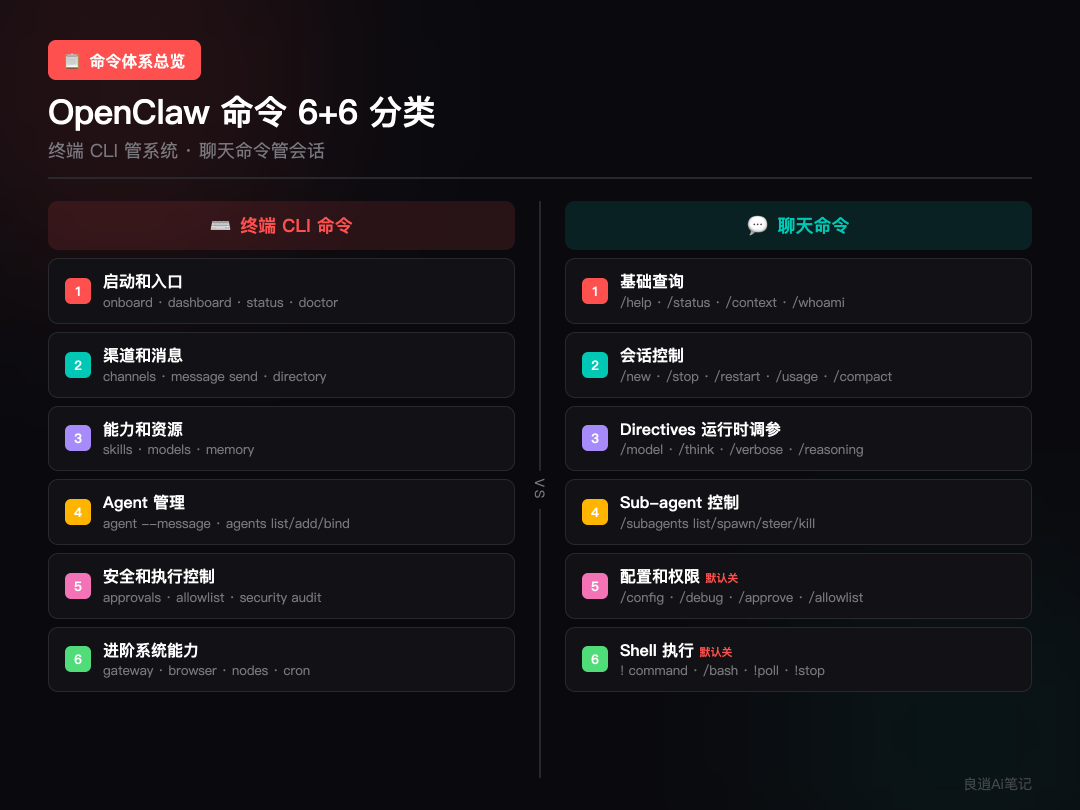
一、终端 CLI 命令:管系统的 6 大类
终端里的 openclaw ... 是系统控制台。我按用途分成 6 组,每组说清楚什么场景会用到。
1)启动和入口
场景:第一次装好、日常检查、出了问题排障。
openclaw onboard          # 初始化引导,首次必跑
openclaw dashboard        # 打开 Dashboard(最快聊天入口)
openclaw status           # 系统整体诊断
openclaw status --deep    # 带实时探测的深度诊断
openclaw status --usage   # 看完整 provider 用量明细
openclaw health           # 快速检查 Gateway 是否正常
openclaw doctor           # 自动排障,出了问题第一个跑它
部署完第一件事:
openclaw dashboard。出了问题第一件事:openclaw doctor。
2)渠道和消息
场景:接入飞书、Telegram 等渠道,或者主动给渠道发消息。
openclaw channels list       # 列出所有渠道
openclaw channels status     # 检查渠道健康(会给修复建议)
openclaw channels add        # 添加渠道
openclaw channels remove     # 移除渠道
openclaw channels login      # 登录渠道账号
openclaw channels logout     # 登出渠道账号
openclaw channels logs       # 查看渠道日志

openclaw message send --target <id> --message <text>
                             # 主动往渠道发消息
openclaw directory           # 查找目标 ID,配合 message send 用
message send 可以主动往 WhatsApp、Telegram、Discord、Slack 等渠道发消息、投票、反应——不用等别人先来。
我用得最多的排障命令是
openclaw channels status --probe --json,一眼能看到哪个渠道挂了。
3)能力和资源
场景:看系统现在有什么 Skill、模型、记忆可以用。
openclaw skills list         # 有哪些技能
openclaw skills info <name>  # 某个技能的详情
openclaw skills check        # 检查技能依赖是否就绪

openclaw models              # 等于 models status
openclaw models list         # 模型列表
openclaw models status       # 模型状态
openclaw models set          # 设置默认模型
openclaw models set-image    # 设置图像模型
openclaw models auth         # 模型认证
openclaw models aliases      # 模型别名
openclaw models fallbacks    # 模型回退链

openclaw memory status       # 记忆索引状态
openclaw memory index        # 建索引
openclaw memory search       # 搜索记忆
这组不是让 Agent 干活,而是看系统层面有哪些资源可用。
4)Agent 管理
场景:从终端直接触发 Agent 运行,或管理多个独立 Agent。
openclaw agent --message "..."    # 触发一轮 Agent 运行
openclaw agent --local            # 本地运行,不走 Gateway

openclaw agents list              # 列出所有独立 Agent
openclaw agents add               # 添加 Agent
openclaw agents delete            # 删除 Agent
openclaw agents bindings          # 查看绑定关系
openclaw agents bind              # 绑定
openclaw agents unbind            # 解绑
openclaw agents set-identity # 设置 Agent 身份注意区分:agent(单数)是直接在终端跑一轮对话;agents(复数)是管理独立 Agent 的 workspace、bindings、identity。
这组适合你需要批量调度或脚本化调用 Agent 的场景。
5)安全和执行控制
场景:控制 Agent 能不能在你的机器上执行命令。
openclaw approvals get                # 查看当前审批规则
openclaw approvals set                # 设置审批规则
openclaw approvals allowlist add      # 添加白名单
openclaw approvals allowlist remove   # 移除白名单

openclaw security audit # 安全审计这组特别重要但容易被忽略。
Exec Approvals 是让 sandboxed Agent 在真实机器上执行命令时的安全闸门。命令能不能跑,要看 policy + allowlist + 用户审批是否同时满足。
它决定 Agent 到底能不能真的动你的机器。 新手建议先用默认策略,搞清楚机制再放开。
6)进阶系统能力
场景:网关运维、浏览器自动化、节点管理、定时任务。新手先不用管。
openclaw gateway install|start|stop|status|restart
                             # 网关服务管理
openclaw browser ...         # 浏览器实例控制
openclaw nodes ...           # 节点管理
openclaw node ...            # 单节点操作
openclaw cron ...            # 定时任务
openclaw backup ...          # 备份
openclaw plugins ...         # 插件管理
openclaw sessions ...        # 会话管理
说明 OpenClaw 的 CLI 不只是聊天入口——它是整套系统的运维控制面。知道有这些就行,用到再查。
二、聊天命令:管会话的 6 大类
聊天里的 /... 由 Gateway 处理,大多数要作为单独一条消息发送。同样按用途分成 6 组。
1)基础查询
场景:在聊天里看”我现在什么状态”。
/help              # 帮助
/commands          # 列出所有可用命令
/status            # 当前会话状态(模型、provider 用量)
/context detail    # 当前上下文有什么文件、工具、skill
/context json      # JSON 格式输出上下文
/whoami 或 /id     # 我的 sender ID
/context detail 特别实用——能看到当前上下文塞了多少东西,包括文件大小、工具数量、system prompt 大小。调试的时候经常用。
2)会话控制
场景:开新对话、停止、重启、看花了多少钱。
/reset 或 /new     # 开新会话
/new <model>       # 开新会话并切换模型
/stop              # 停止当前运行
/restart           # 重启

/usage off         # 关闭 usage 显示
/usage tokens      # 每条回复后显示 token 用量
/usage full        # 完整 usage
/usage cost        # 打印本地 session 的成本汇总

/compact           # 压缩上下文(对话太长时用)
/usage cost想控制花费的话很有用,能看到当前 session 花了多少钱。
3)Directives:运行时调参
场景:切模型、调思考级别、开调试信息。
这组是聊天命令里最有门道的。Directives 不是聊天文本,是运行时控制信号。
核心机制:混在消息里发只是临时 hint;单独发一条才会持久化到 session。(上一篇有详细解释。)
/model <name>        # 切换模型
/model list          # 列出可用模型
/model status        # 当前模型状态

/think off           # 关闭思考
/think minimal       # 最小思考
/think low           # 低
/think medium        # 中等
/think high          # 高
/think xhigh         # 极高

/verbose on|full|off # 详细信息(调试用,正常建议关)

/reasoning on|off|stream   # 输出推理过程
/elevated on|off|ask|full  # 提升执行权限
/exec host=<...>           # 执行环境参数
/queue # 队列控制注意:/reasoning 和 /verbose 在群聊里有风险——可能暴露你不想公开的内部推理或工具输出。正常使用建议关着。
4)Sub-agent 控制
场景:查看和管理当前对话里派出去的子助手。
/subagents list       # 当前有哪些子 Agent
/subagents spawn      # 启动一个子 Agent
/subagents info <id>  # 子 Agent 详情
/subagents log <id>   # 查看某个子 Agent 的日志
/subagents send <id>  # 给子 Agent 发消息
/subagents steer <id> # 中途调整方向
/subagents kill <id> # 终止子 Agent这组不是改系统配置,而是管当前 session 里的子助手。比如你让 OpenClaw 同时处理多个任务,可以用 /subagents list 看进度,用 /subagents steer 中途调方向。
5)配置和权限(默认关闭)
场景:在聊天里改配置或处理审批。需要手动开启。
/config show         # 查看配置
/config get <key>    # 读取某项
/config set <k> <v>  # 修改配置(写入磁盘 openclaw.json)
/config unset <key>  # 删除某项

/debug show          # 查看运行时调试配置
/debug set <k> <v>   # 修改(只改运行时,不写磁盘)
/debug unset <key>   # 删除
/debug reset         # 重置

/approve <id> allow-once    # 本次允许
/approve <id> allow-always  # 永久允许
/approve <id> deny          # 拒绝
/allowlist # 查看或修改白名单注意:/config 需要先开 commands.config: true,/debug 需要 commands.debug: true。都是 owner-only,普通用户无权使用。
6)Shell 执行(默认关闭)
场景:在聊天里直接执行宿主机命令。谨慎使用。
! <command>      # 在宿主机跑命令
/bash <command>  # 同上,别名
!poll            # 查看长时间运行的命令状态
!stop            # 停止运行中的命令
需要 commands.bash: true,还要配合 tools.elevated 的 allowlist。
聊天里也能跑命令,但它不是普通 shell——受更严格的安全控制。
三、速查总表
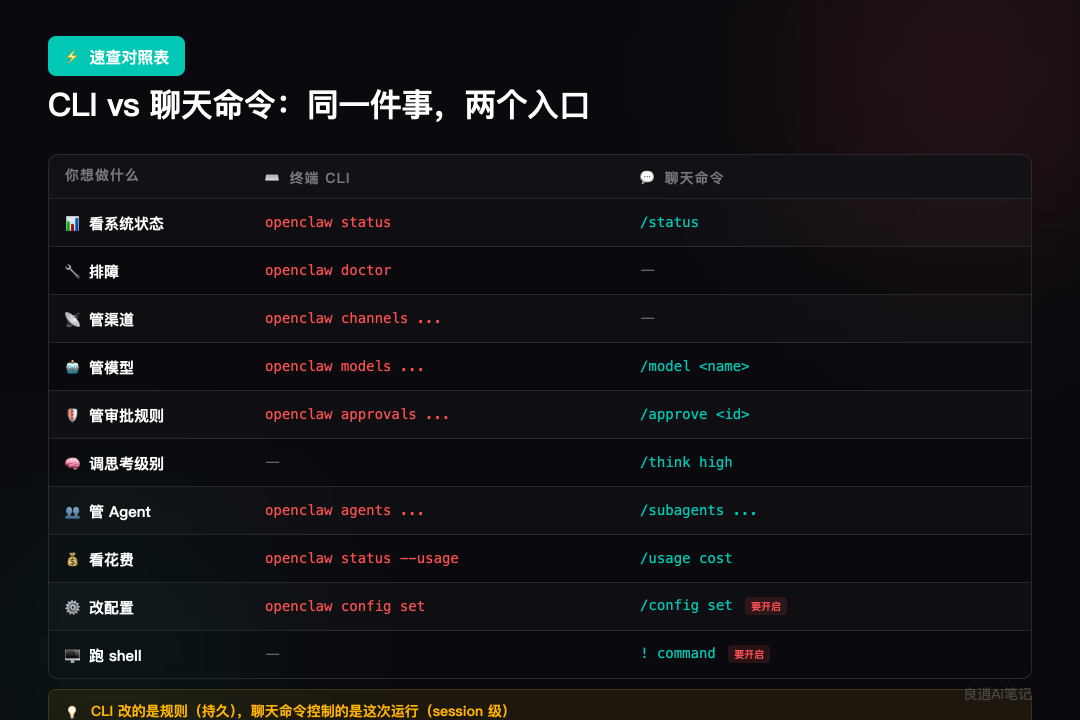
openclaw status | /status | |
openclaw doctor | ||
openclaw channels ... | ||
openclaw message send | ||
openclaw models ... | ||
/model <name> | ||
openclaw approvals ... | ||
/approve ... | ||
openclaw agents ... | ||
/subagents ... | ||
/think ... | ||
/context detail | ||
openclaw status --usage | /usage cost | |
openclaw config set | /config set | |
! <command> |
四、核心区别就一句话
CLI 改的是规则,聊天命令控制的是这次运行。
终端里改的东西是持久的、系统级的。聊天里改的东西(除了 /config)基本只影响当前 session。
这篇建议收藏,用到的时候查比翻官方文档快。
上一篇讲的是理解框架(《为什么 openclaw status 和 /status 不一样》),这篇是具体速查。两篇配合着看,基本就不会再搞混了。
系列回顾:
• 第一篇:「68 块钱搭建 OpenClaw,接入飞书 + Telegram」— 教你部署 • 第二篇:「新手最该先搞懂的 2 套命令」— 帮你理解 • 第三篇:就是这篇 — 方便你查
后面还会写 Agent 配置和多代理协作的实战经验,感兴趣的可以先关注。
有什么问题,评论区见。
